
Find Maxima
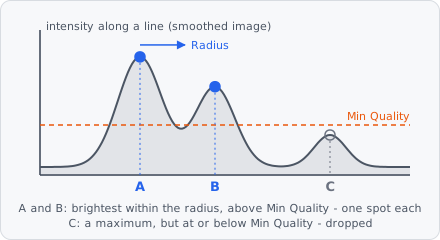
Find Maxima finds spots as local maxima: every pixel with no brighter pixel within Radius becomes one object of a single pixel. The image’s value at the maximum is its quality; maxima at or below a cut-off are dropped. Use it for small, round spots (vesicles, foci, particles) that touch or lie close together, in place of Threshold + Connected Components + Watershed.
In a project file it is FIND_MAXIMA.
It works best on an image smoothed at the size of the spots, e.g. with Gaussian Blur, or on the result of a spot filter - Laplacian of Gaussian, Difference of Gaussians or Wavelet Spots, which also remove the background: each spot is then one peak. A typical spot pipeline:
Laplacian of Gaussian (or Gaussian Blur) → Find Maxima → Extract Objects → Transform Objects (Draw circle)
Find Maxima writes the segmentation and one instance per maximum, so Extract Objects can follow directly. The image itself stays as it is. The spots are one pixel each; give them a size afterwards with Draw circle, or grow each one into its own outline with Grow Regions.
One-pixel objects are hard to see when zoomed out: wherever a one-pixel object is smaller on screen than 5 px, it is drawn as a dot of 5 px (fill and outline like every object), and a click on the dot selects it. This is display only; the object stays one pixel.
Parameters
Section titled “Parameters”| Parameter | Description |
|---|---|
| Radius | A pixel is a maximum only if no pixel within this radius is brighter. About half the spot diameter: smaller finds several maxima per spot, larger merges neighbouring spots into one. Default 2, range 1-1000. |
| Radius Unit | Unit of Radius: px (default) or nm. |
| Cutoff | How the quality cut-off is chosen: Manual (default), Otsu or Noise - see Cutoff. |
| Noise Factor | With Noise: how many times the noise a maximum must lie above the background. 3 keeps few noise peaks, 5 hardly any; lower finds fainter spots and more noise. Default 3, range 0-100. |
| Min Quality | Maxima with a quality at or below this value are dropped. With Otsu and Noise: the lowest cut-off. Default 0. |
| Quality Unit | (advanced) Unit of Min Quality: bit (default, 0-255 or 0-65535), % (0-100) or rel (0-1). |
| Inside Segmentation | Only maxima on pixels of the current segmentation count (any class, e.g. from a Threshold before). Brighter pixels outside it still suppress maxima within the radius. Off by default. |
| Exclude At Edges | Drop maxima closer to the image border than the radius. Off by default. |
| Segmentation Class | The segmentation class the maxima get. |
How it works
Section titled “How it works”- Peaks: a pixel is a peak if no pixel within Radius is brighter - all pixels with . With nm, is Radius divided by the mean pixel size of x and y; without a pixel size, nm are taken as pixels. is at least 1, so the four direct neighbours always count.
- Plateaus: neighbouring pixels of equal value (8-connected) form a plateau. It is a maximum only if every pixel of it is a peak, and the pixel nearest the plateau’s centre stands for it. A flat region with no darker pixel next to it - a background of 0, a flat image - is never a maximum.
- Equal maxima: of two equal maxima within the radius, the one found first (row by row) is kept. With Inside Segmentation, a maximum on a pixel outside the segmentation is dropped here.
- Edges: with Exclude At Edges, maxima closer than to the image border are dropped.
- Quality: maxima whose value is above the cut-off are kept (, like Threshold’s minimum).
The segmentation and the instance map are cleared first, then each maximum is written with Segmentation Class and its own instance (1, 2, … row by row).
Cutoff
Section titled “Cutoff”| Cutoff | Cut-off |
|---|---|
| Manual | Min Quality. |
| Otsu | Otsu’s method on the qualities of all maxima found - 256 bins between the lowest and the highest quality - splits spots from noise peaks. Min Quality stays the lowest cut-off, so an image without spots doesn’t turn its noise into spots. With fewer than two different qualities there is nothing to split: Min Quality is used. |
| Noise | background + Noise Factor × noise, at least Min Quality. The background is the median of all pixels of the image this step gets, the noise their median absolute deviation × 1.4826 (the standard deviation for normally distributed noise); pixels that are not a number are skipped. Background and noise scale with the exposure, so the same factor fits every exposure. After a blur or spot filter the noise of the filtered image counts. |
Noise assumes the spots cover less than half the image - otherwise they raise the background.
In a project file the cut-off is a tagged value: {"type": "MANUAL"}, {"type": "OTSU"} or {"type": "NOISE", "noiseFactor": 3}.
The detection - local maxima within a radius, then a brightness cut-off - is the one Sbalzarini & Koumoutsakos (2005) describe for particles; the step cites it, Otsu (1979) with Otsu, and Hampel (1974) - the noise as scaled median absolute deviation - with Noise.
References
Section titled “References”- Sbalzarini I. F. & Koumoutsakos P., “Feature point tracking and trajectory analysis for video imaging in cell biology,” Journal of Structural Biology, vol. 151, pp. 182-195, 2005. doi:10.1016/j.jsb.2005.06.002
- Otsu N., “A Threshold Selection Method from Gray-Level Histograms,” IEEE Trans. Systems, Man, and Cybernetics, vol. 9, no. 1, pp. 62-66, 1979. doi:10.1109/TSMC.1979.4310076
- Hampel F. R., “The Influence Curve and Its Role in Robust Estimation,” Journal of the American Statistical Association, vol. 69, pp. 383-393, 1974. doi:10.1080/01621459.1974.10482962
Limitations
Section titled “Limitations”- Each spot is one pixel at its maximum: no size, no sub-pixel position.
- It replaces the segmentation of the steps before - Inside Segmentation only uses it to choose the maxima.
- Whole slides are searched tile by tile, and a tile doesn’t see the pixels of its neighbours. A spot right on the border between two tiles can be found in both: two spots, which cross-tile merging only joins if their pixels touch. Images small enough to be one tile are not affected.
- On a whole slide, Otsu takes the maxima of each tile and Noise the pixels of each tile, not of the whole image.