
Grow Regions
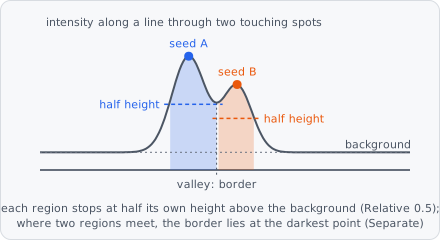
Grow Regions grows a region from each seed object through an image, like a magic wand: for example a spot’s outline from its maximum, or a nucleus from a point inside it. Pixels join a region from the seed outwards, and every seed has its own stop level - relative to its own peak and background, so dim and bright objects keep the same shape. Where regions of different seeds meet they are split on the darkest line between them, may overlap, or are merged.
A typical spot pipeline:
Find Maxima → Extract Objects → Grow Regions
Each region is a new object of the Output Class and keeps its seed’s pixels. The seeds stay as they are and the region is not linked to its seed: use Relate Objects for that. The regions’ intensities are measured on the raw channels, also with Smoothing. To keep the seeds (e.g. the one-pixel maxima) out of the results, give their class the class setting Results › Intermediate (see What goes into the results).
In a project file it is GROW_REGIONS; Growth Channel is written as "PIPELINE_STEP", {"IMAGE_CHANNEL": 1} or {"MEMORY": {"pipelineContext": 0}} (memory slot 0 of the pipeline).
Grow Regions works on the whole image, after the steps that run tile by tile. With Pipeline Step or Memory the image it grows through is kept at the step’s place while the tiles run, so it sees the image as it was there, not as later steps change it.
When to use
Section titled “When to use”- Spots: give the one-pixel maxima of Find Maxima a size and shape of their own, cut at the same relative height for dim and bright spots (Order Intensity, Stop Relative 0.5 - the full width at half maximum).
- Evenly bright objects (nuclei, organelles) from a seed inside them: Order Similarity.
- Touching objects: Separate splits them on the darkest line between them, as a watershed would, but each region still stops at its own level.
To divide the whole image (or a mask) among seeds, with no stop level - cells around nuclei - use Propagation.
Parameters
Section titled “Parameters”| Parameter | Description |
|---|---|
| Seeds | Objects of this class are the seeds (e.g. the maxima of Find Maxima after Extract Objects, or nuclei). Each grows into one region. |
| Growth Channel | The image the regions grow through. Pipeline Step (default): the pipeline’s image as it is at this step, e.g. after a background subtraction. Image Channel: an image channel as it was read (the raw spot or nucleus stain), picked below. Memory: a memory slot as it is at this step, stored earlier by Image Cache, picked below. |
| Smoothing | Smooths the growth image before growing (noisy images): None (default) or Gaussian. The growth order, stop level, background and noise then come from the smoothed pixels. |
| Sigma | With Gaussian: the standard deviation of the Gaussian. Noise smaller than σ no longer stops or splits a region. As a guide, 1-2 px for noisy spots, at most about a quarter of the smallest object’s radius (larger blurs the outlines). Default 1, range 0.1-100. |
| Unit | With Gaussian: unit of Sigma, px (default) or nm. |
| Objects Are | Bright (default): objects brighter than their background (fluorescence). Dark: objects darker than their background (brightfield, stains) - everything below then counts the other way round. |
| Order | Which neighbouring pixel joins a region next - see Order. Intensity (default) or Similarity. |
| Stop | Which pixels may join a region - see Stop. Relative (default), Tolerance, Threshold or Noise, each with its own value below it. |
| Max Distance | How far a region reaches at most from its seed (from the nearest seed pixel). Also where the background is measured: a little more than the largest object’s radius. Default 10, range 1-1000. |
| Distance Unit | Unit of Max Distance: px (default) or nm. |
| When Regions Meet | What happens where regions of different seeds meet - see When regions meet. Separate (default), Overlap or Merge. |
| Mask | Regions only grow into pixels of objects of this class (e.g. the thresholded cells). Unset: everywhere. |
| Output Class | The class the grown regions get. |
| Exclude At Edges | Discard regions that touch the image border. Off by default. |
Seeds and Output Class must be set, else the step fails with an error.
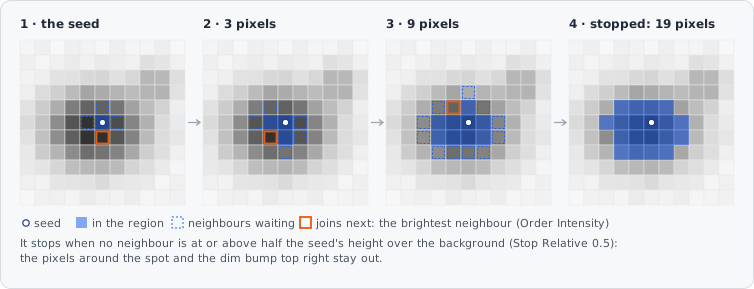
A region grows one pixel at a time: of all pixels next to it, the one the Order picks joins next, as long as the Stop rule lets it. It is done when no neighbour may join (or Max Distance is reached).
| Order | Next pixel |
|---|---|
| Intensity | The brightest: a region spreads downhill from its peak. For objects with a bright centre that fades out (spots, blobs). |
| Similarity | The one closest to the seed’s value (the median of the seed’s pixels): a region covers what looks like its seed. For evenly bright objects (nuclei, organelles); larger seeds give a steadier value than a single pixel. |
The seed’s own pixels always belong to its region. For Relative and Noise, the background is the median of the pixels in a 2 px wide ring just beyond Max Distance around the seed, the noise their median absolute deviation × 1.4826.
| Stop | Value | Pixels that may join |
|---|---|---|
| Relative | Fraction, default 0.5, range 0-1 | A level between the background (0) and the seed (1). 0.5 cuts each region at half its height, so dim and bright objects keep the same shape. Intensity: pixels at or above the level, measured from the region’s peak (the brightest pixel the seed reaches without going down). Similarity: pixels closer to the seed’s value than (1 - Fraction) of its contrast, on either side. A seed not above its background grows nothing. |
| Tolerance | Tolerance (default 10, range 0-65535) and Unit (bit default, %, rel) | The classic magic wand. Intensity: pixels at most Tolerance below the region’s peak. Similarity: pixels at most Tolerance from the seed’s value, on either side. |
| Threshold | Level (default 0, range 0-65535) and Unit (bit default, %, rel) | Pixels above one fixed level, the same for every seed. |
| Noise | Noise Factor, default 3, range 0-100 | Pixels more than Noise Factor times the noise above the background: a region covers what stands out from the noise around it - the same factor fits every exposure. |
When regions meet
Section titled “When regions meet”| When Regions Meet | Result |
|---|---|
| Separate | Each pixel goes to one region: the border lies on the darkest line between them (touching spots counted apart). |
| Overlap | Every region grows as if it were alone: a pixel may belong to several (e.g. each spot’s whole halo). A region may then take in a neighbouring spot if the valley between them stays above its stop level. |
| Merge | Regions that meet over a shallow valley become one object (several maxima on one object); regions with a deep valley between them stay apart. Max Valley (default 0.2, range 0-1): the deepest valley merged, as a part of the dimmer region’s contrast (peak - background) - 0.2 merges regions whose border lies at most 20 % below the dimmer peak. Two objects only touching at their stop level never merge below 1 - the stop fraction. A merged region is given to the first of its seeds. |
How it works
Section titled “How it works”Pixels join a region in a priority order from the seed outwards (seeded region growing, Adams & Bischof 1994), through the 8 neighbours of each pixel: the brightest first with Intensity (a flooding from markers as in Vincent & Soille 1991), the most similar to the seed first with Similarity. A pixel joins only if the Stop rule accepts it and it lies within Max Distance of the seed. With Tolerance and Intensity, a region is the support of its peak’s h-dome (Vincent 1993).
How seeds compete. Each seed is flooded on its own, inside Max Distance of it. A pixel’s score for a seed is the best path to it: the highest of the lowest brightness along the path (Intensity), or the lowest of the largest difference to the seed’s value (Similarity). With Separate a pixel goes to the seed scoring best on it (then the nearer one, then the first in image order), and each region keeps the pixels connected to its seed. Because the result is defined per pixel from the seeds near it, it doesn’t depend on how the image is split up.
Smoothing. With Gaussian, the growth image is smoothed with the discrete Gaussian (Lindeberg 1998) before growing, mirrored at the image’s border. Every pixel gets the value it would get from smoothing the whole image.
The step runs on the whole image at once, so a region can grow across tile borders. Exclude At Edges checks the border of the image, not of a tile.
Limitations
Section titled “Limitations”- Seeds 1024 px across or more (a tissue-sized object) don’t grow: their region is the seed.
- No sub-pixel outlines: a region is a set of whole pixels.
- Relative and Noise measure the background just beyond Max Distance: if other objects lie there, the background comes out too high. Choose Max Distance a little larger than the largest object’s radius.
References
Section titled “References”- Adams R. & Bischof L., “Seeded Region Growing,” IEEE Transactions on Pattern Analysis and Machine Intelligence, vol. 16, pp. 641-647, 1994. doi:10.1109/34.295913
- Vincent L. & Soille P., “Watersheds in Digital Spaces: An Efficient Algorithm Based on Immersion Simulations,” IEEE Transactions on Pattern Analysis and Machine Intelligence, vol. 13, pp. 583-598, 1991. doi:10.1109/34.87344 - with Order Intensity.
- Vincent L., “Morphological Grayscale Reconstruction in Image Analysis: Applications and Efficient Algorithms,” IEEE Transactions on Image Processing, vol. 2, pp. 176-201, 1993. doi:10.1109/83.217222 - with Stop Tolerance and Order Intensity.
- Hampel F. R., “The Influence Curve and Its Role in Robust Estimation,” Journal of the American Statistical Association, vol. 69, pp. 383-393, 1974. doi:10.1080/01621459.1974.10482962 - with Stop Noise.
- Lindeberg T., “Feature Detection with Automatic Scale Selection,” International Journal of Computer Vision, vol. 30, pp. 79-116, 1998. doi:10.1023/A:1008045108935 - with Smoothing Gaussian.
The step always cites Adams & Bischof and the others only with the settings named; see Citation for exporting the citations of a project.