
Morphological Transform
The Morphological Transform command applies a structural element to reshape regions in an image. It is typically used after thresholding to clean up binary masks before object extraction.
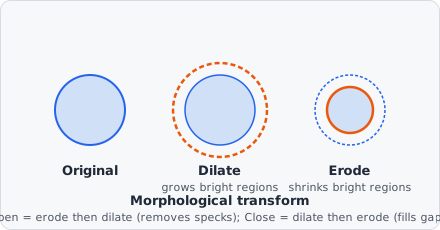
All four operations boil down to sliding a small shape (the structuring element) across the image and asking either “does it fit entirely inside the bright region here?” (erosion) or “does it touch the bright region at all here?” (dilation) - opening and closing just chain the two in different orders to get asymmetric effects: shrink-then-grow erases anything too small to contain the structuring element at all, while grow-then-shrink bridges gaps that are narrower than it.
Operations
Section titled “Operations”| Operation | Effect |
|---|---|
| Erosion | Shrinks bright regions; removes thin protrusions and isolated noise pixels |
| Dilation | Expands bright regions; fills small holes and gaps |
| Opening | Erosion followed by dilation - removes small bright objects while preserving large ones |
| Closing | Dilation followed by erosion - fills small dark holes while preserving overall shape |
Parameters
Section titled “Parameters”| Parameter | Description |
|---|---|
| Operation | Erosion, Dilation, Opening, or Closing |
| Kernel size | Side length of the structuring element (pixels) |
| Kernel shape | Box (square), Cross (plus), or Ellipse (circle/oval) |
| Iterations | Number of times the operation is repeated (default: 1) |
| Use greyscale | Apply the operation to the greyscale image instead of the binary mask |
Kernel shapes
Section titled “Kernel shapes”| Shape | Description |
|---|---|
| Box | All pixels in a square neighbourhood are included |
| Cross | Only horizontal and vertical neighbours (plus pattern) |
| Ellipse | Pixels inside an elliptical boundary; creates circular structuring elements when width = height |
Iterations
Section titled “Iterations”Running an operation multiple times is equivalent to using a larger effective kernel but can be more efficient. For example, 3 iterations of a 3×3 dilation roughly approximates one pass with a 7×7 structuring element.
When to use
Section titled “When to use”- Erosion - separate objects that are barely touching; remove single-pixel noise.
- Dilation - connect small gaps in a detected contour.
- Opening - remove debris / small artefacts from a binary mask without changing the size of larger objects significantly.
- Closing - fill small holes inside detected objects.
Background
Section titled “Background”The mathematical framework behind these operations - structuring elements, erosion, dilation, and their compositions - is mathematical morphology, developed by Georges Matheron and Jean Serra at the Centre de Morphologie Mathématique in the 1960s-70s and formalized in Jean Serra, Image Analysis and Mathematical Morphology, Academic Press, 1982.