
Distance Transform
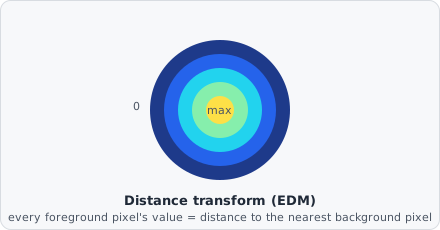
The Distance Transform command computes the Euclidean Distance Map (EDM) of a binary image. Each foreground pixel is assigned a value equal to its distance to the nearest background pixel. The result is a greyscale image that can be used as input to subsequent image-processing steps.
The EDM turns a flat binary mask into a “how deep inside the object am I” landscape - pixels right at the edge are near zero, pixels at the object’s core are the brightest. This is exactly the landscape Watershed floods from local maxima to split touching objects.
When to use
Section titled “When to use”The Distance Transform is useful as an intermediate processing step:
- Feed the EDM into Watershed for improved separation of touching objects.
- Use the EDM to create distance-weighted masks.
For measuring pairwise distances between detected objects, refer to the distance metrics in Classify Objects and the Metrics reference - these are computed automatically during object classification.
Parameters
Section titled “Parameters”| Parameter | Description |
|---|---|
| Threshold | Pixels below this intensity are treated as background (0) before distance computation |
| Edges are background | If enabled, image border pixels are treated as background regardless of their intensity |
Background
Section titled “Background”Computing an exact (rather than approximated “chamfer”) Euclidean distance map efficiently was addressed by Per-Erik Danielsson, “Euclidean Distance Mapping,” Computer Graphics and Image Processing, vol. 14, no. 3, pp. 227-248, 1980 - one of the foundational references for this class of algorithm, which underlies distance-map watershed segmentation throughout image analysis software including ImageJ.