
Illumination Correction
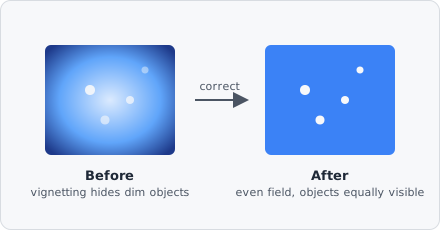
The Illumination Correction command estimates and removes a smooth, slowly-varying gain/offset field caused by uneven illumination - vignetting, dust on the condenser, uneven excitation - equivalent to CellProfiler’s CorrectIlluminationCalculate and CorrectIlluminationApply modules combined into one step.
When to use
Section titled “When to use”Use it when images are brighter in the middle and dimmer toward the edges/corners, or show any other smooth shading pattern that repeats the same way across every tile or every image from the same microscope/camera setup - a consequence of the optics or illumination, not the sample. Left uncorrected, that shading makes intensity comparisons between regions of an image (or between images/wells) unreliable, even though it rarely stops segmentation from finding objects on its own.
Use Rolling Ball instead when the problem is a local background glow or halo under/around individual objects (out-of-focus light, autofluorescence, uneven staining) that differs from image to image rather than being tied to the acquisition setup. Illumination Correction estimates one global, low-frequency field for the whole image/channel; Rolling Ball estimates a local per-object baseline. Illumination Correction won’t remove a local halo, and Rolling Ball won’t fix a global brightness gradient.
Parameters
Section titled “Parameters”| Parameter | Description |
|---|---|
| Method | How the illumination field is estimated from the image - Regular (block mean) or Background (block minimum) |
| Block size | Block size in pixels used to reduce the image to a coarse illumination estimate before smoothing (default 60) |
| Smoothing | How the block-reduced field is smoothed to remove blockiness - None, Gaussian, Median, or Fit polynomial |
| Apply method | How the estimated field is combined with the original image - Divide or Subtract |
| Rescale | Stretch the corrected image’s intensities back to fill the full range afterward |
Method
Section titled “Method”- Regular (block mean) - the right default for typical uneven illumination. Every block contributes its average brightness to the estimated field.
- Background (block minimum) - use this when dense or bright foreground objects would otherwise pull the mean-based estimate upward; the minimum hugs the true background floor instead.
Block size
Section titled “Block size”Should be larger than the largest foreground object in the image, so objects are averaged/eroded away during block-reduction and only the slow-varying illumination trend survives.
Smoothing
Section titled “Smoothing”Applied to the block-reduced field to remove blockiness/noise before it’s enlarged back to full resolution:
| Option | Description |
|---|---|
| None | Use the block-reduced field as-is |
| Gaussian | Separable Gaussian blur of the block grid, controlled by Sigma (in block-grid units) |
| Median | Windowed median filter of the block grid, controlled by Radius (in block-grid units) |
| Fit polynomial | Fits a smooth 2nd-order polynomial surface through the block grid - no tunable radius/sigma, so it’s the most stable option when unsure |
Apply method
Section titled “Apply method”- Divide -
corrected = image * mean(field) / field. Multiplicative correction that preserves overall image brightness; the right default for gain/vignetting-style illumination problems. - Subtract -
corrected = image - (field - mean(field)). Additive correction.
Rescale
Section titled “Rescale”Enable to stretch intensities back to fill [0, 1] after correction - guards against Divide pushing previously-dim regions above the maximum.
How it works
Section titled “How it works”- Block reduce - the image is reduced to a coarse grid, one value per block (mean or min, per Method).
- Smooth - the block grid is smoothed per Smoothing to remove blockiness/noise.
- Enlarge - the smoothed grid is bilinearly upscaled back to the original resolution, producing the full-size illumination field.
- Apply - the field is divided out or subtracted per Apply method, and optionally rescaled.
For RGB images, each channel is corrected independently, since illumination unevenness (vignetting, filter/dichroic effects) is frequently channel/wavelength dependent.