
Fill Holes
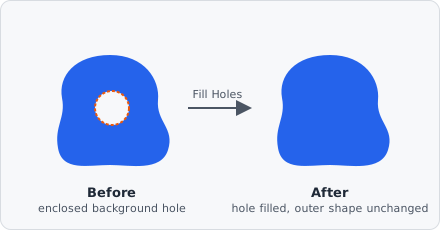
The Fill Holes command closes enclosed background holes in the segmentation map - a direct port of ImageJ’s Process > Binary > Fill Holes. A background pixel is a “hole” exactly when it cannot be reached from the image border by a path of other background pixels; every such pixel is turned into foreground, while everything else is left untouched.
Parameters
Section titled “Parameters”Fill Holes has no configurable parameters - drop it into the pipeline and it runs.
How it works
Section titled “How it works”Which pixels count as a hole is decided the same way ImageJ’s own command does:
- Every non-background pixel counts as foreground, regardless of its actual class/label value - so a background pocket enclosed by any mix of labels is still a hole.
- Connectivity is 4-connected (up/down/left/right), not 8-connected: a background region that only touches the outside diagonally through a corner still counts as enclosed and gets filled. This matches ImageJ’s
FloodFillerexactly.
Unlike ImageJ, each hole is then filled with the label that encloses it: every enclosed background region is filled with the label most common among its bordering pixels. A hole inside a class-2 region is therefore filled with class 2, which keeps multi-class segmentation maps correct.
When to use
Section titled “When to use”- Close small punctures or single-pixel gaps left inside an otherwise solid object after thresholding.
- Run it before Extract Objects so area and shape metrics aren’t skewed by holes that should belong to the object.
Background
Section titled “Background”Fill Holes belongs to the Object category, alongside commands like Extract Objects and Voronoi, and can only be followed by another Object-category command.