Classify Objects
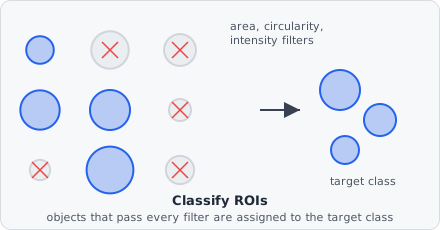
The Classify Objects command evaluates every object against a set of shape criteria and, optionally, an intersection criterion. Each object either matches (passes every enabled criterion) or does not, and the selected match handling mode decides what happens to the object’s class labels in each case - add a class, strip a class, or reclassify entirely.
This is where raw segmentation output (“every connected group of bright pixels”) turns into biological meaning (“this is a nucleus, this is an EV - that speck isn’t”) - the criteria exist because segmentation almost always over-detects, picking up noise, debris, and imaging artifacts alongside genuine objects. Because match handling is itself configurable, the same command also covers narrowing an already-named population and reclassifying objects based on what they overlap.
Input Selection
Section titled “Input Selection”| Parameter | Description |
|---|---|
| Input Classes | Restrict evaluation to objects that already carry every one of these classes. Leave empty to evaluate every object regardless of its current class |
Objects created by Extract Objects carry their segmentation class as an object class from the start, so a fresh, unfiltered population can be selected here the same way as an already-named class from an earlier Classify Objects step. See Object Classes for how that numbering works and why listing more than one class here narrows the population rather than widening it.
Shape Criteria
Section titled “Shape Criteria”An object matches only if it satisfies every criterion below - they combine as a logical AND, not a choice of one.
All shape-based criteria accept the field’s maximum representable value as “no limit” for the upper bound and 0 for “no lower limit” - there is no dedicated “disabled” sentinel, so leaving a bound at its default effectively disables it.
| Criterion | Description |
|---|---|
| Min area / Max area | Object area, in the chosen Size unit |
| Min circularity / Max circularity | Range 0.0-1.0; 1.0 = perfect circle |
| Min solidity / Max solidity | Ratio of area to convex hull area (0-1) |
| Min aspect ratio / Max aspect ratio | Fitted-ellipse major/minor axis ratio |
| Min eccentricity / Max eccentricity | Elongation from fitted ellipse (0 = circle, 1 = line segment) |
| Min Feret / Max Feret | Bounding-box diagonal, in the chosen Size unit |
| Allow edge touching | If disabled, objects that touch the image border fail the match |
Size unit
Section titled “Size unit”Shape criteria that depend on physical size (area, Feret) use a single Size unit shared by both:
- Pixels (px) - absolute pixel count
- Nanometres (nm) - converted using the pixel size from image metadata
There is no separate intensity filter in Classify Objects - mean/min/max/sum intensity per channel are recorded as metrics on every object, but they aren’t part of the match criteria here.
Intersection Criterion
Section titled “Intersection Criterion”An optional, additional criterion evaluated alongside the shape criteria above - an object must satisfy this too, not instead.
| Criterion | Description |
|---|---|
| Intersecting With | An object class to test overlap against. When set, the object only matches if it also overlaps at least one object of this class by at least Min intersection area |
| Min intersection area | Minimum overlap area, in the chosen Size unit. Has no effect while Intersecting With is unset |
Unlike the shape criteria, this one is disabled entirely by leaving Intersecting With unset (no sentinel value needed) rather than by relaxing a threshold. It corresponds to the Intersection Count metric - counting how many objects from another class overlap a given object - used here as a pass/fail gate rather than just a recorded value.
Match Handling
Section titled “Match Handling”Every object is evaluated once against the criteria above to get a single match / no match result. Match Handling then decides what that result does to the object’s classes:
| Mode (GUI label) | On match | On non-match |
|---|---|---|
| Add class on match | Add Output Tag to the object’s existing classes | No change |
| Add class on mismatch | No change | Add Output Tag to the object’s existing classes |
| Remove output class on match | Remove Output Tag from the object | No change |
| Remove output class on mismatch | No change | Remove Output Tag from the object |
| Remove objects matching criteria | Clear all classes from the object | No change |
| Keep objects matching criteria (default) | No change | Clear all classes from the object |
| Reclassify on match | Clear all classes, then add Output Tag | No change |
| Reclassify on mismatch | No change | Clear all classes, then add Output Tag |
Choosing a mode
Section titled “Choosing a mode”- First-time classification (segmentation class → a real named class) and reclassifying by overlap (moving objects into another class based on what they intersect) are both worked through in the examples below.
- Narrowing an already-named population with a stricter filter, without renaming it: leave Output Tag unset and use the default Keep objects matching criteria - objects that fail the new criteria are dropped; objects that pass keep their existing class untouched.
- Tagging without removing anything else: use Add class on match to layer an additional class onto objects that already carry others, e.g. flagging objects that also satisfy a secondary criterion.
Example: Spot detection
Section titled “Example: Spot detection”Input Classes: (empty - segmentation class from Extract Objects)Min area: 3 px²Min circularity: 0.1Allow edge touching: trueMatch Handling: Reclassify on matchOutput Tag: ch1@spotObjects larger than 3 px² with any circularity are reclassified as ch1@spot; everything else keeps only its segmentation class and is dropped from all named-class results.
Example: Reclassify by overlap
Section titled “Example: Reclassify by overlap”Input Classes: ch1@spotIntersecting With: tetraspeck@spotMin intersection area: 1 px²Match Handling: Reclassify on matchOutput Tag: tetraspeck@spotAny ch1@spot object that overlaps a tetraspeck@spot calibration bead is moved into the tetraspeck@spot class, removing it from the spot count - the pattern used in Spot Count to exclude bead artefacts.