
Exclude Image
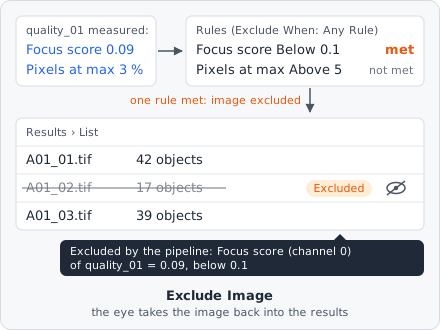
Exclude Image leaves an image out of the results when its measurements say it is bad. Each rule compares a measurement of an earlier step - for example the focus score of Image Quality - with a value. When the rules are met, the image is still analysed to the end, but it is marked as Excluded in the results, with the reason. You can check it by hand and take it back in if it is fine.
It is a measurement step. Put it after the steps whose values it reads.
Parameters
Section titled “Parameters”| Parameter | Description |
|---|---|
| Exclude When | Any Rule (default): one rule met is enough. All Rules: every rule must be met. |
| Rules | The rules, each with the three settings below. Without a rule the step does nothing. |
Each rule:
| Setting | Description |
|---|---|
| Measurement | The measurement, picked from the values the project’s measurement steps make, e.g. “quality_01 · Focus score (channel 0)”. It must have one value per image (an image measurement), not one per object. |
| Comparison | Below: met when the measurement is smaller than the value (e.g. a focus score too low). Above: met when it is larger (e.g. too many saturated pixels). |
| Value | The limit, in the measurement’s unit (e.g. % for Pixels at the maximum). |
How it works
Section titled “How it works”The rules are checked on every image plane, after the steps before it have measured the plane. Below and Above are strict: a value equal to the limit does not meet the rule. A measurement without a value (e.g. the power log-log slope of a flat image, or the µm² of an image without pixel size) meets no rule.
If one plane meets the rules, the whole image is excluded. Its objects and measurements are still stored - nothing is lost.
The step stops the analysis of the image with an error when a rule has no measurement, when the measurement is not made before this step, or when it is a measurement per object.
The reason
Section titled “The reason”The reason lists the rules that were met, e.g.
Focus score (channel 0) of quality_01 = 0.09, below 0.1
Several met rules are joined with ;. A second Exclude Image step that excludes the image adds its reason. In a z-stack or time-lapse the reason names the first plane that met the rules, e.g. “t 0, z 3: … (and 2 more planes)”.
In the results
Section titled “In the results”An excluded image is treated like an image left out by hand:
- In the List view its rows are dimmed and struck through, with an Excluded badge at the right; hovering it shows “Excluded by the pipeline: …” with the reason. An image left out by hand shows Left out instead.
- It is left out of every aggregated value - the well’s value in the plate view, and the plate/well exports - and skipped by exports that cover all images.
- The eye at the row’s right (Take this image back into the results) takes it back in. To take several back in at once, tick their rows and click Take back in (or Leave out) in the bar above the table.
Taking an image back in by hand removes the reason: if you later leave it out again, it shows Left out. The setting is stored in the results database.
Limitations
Section titled “Limitations”- Only image measurements can be used, not measurements per object (e.g. the colocalization per object).
- The rules of one step combine with either Any Rule or All Rules. For mixed logic, use several Exclude Image steps: each one can exclude the image on its own.