
Measure Colocalization
Measure Colocalization measures how the intensities of two channels go together, pixel by pixel: Pearson’s correlation, Manders’ M1 and M2, the overlap coefficient, K1 and K2, the rank-weighted colocalization (RWC) and, optionally, Manders with Costes’ automatic thresholds. It gives these values for the whole image and, optionally, for each object of a class. The values are those of CellProfiler’s MeasureColocalization, value for value.
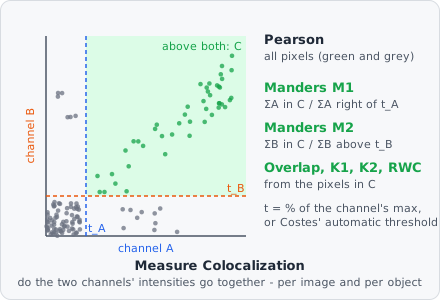
This is not the Colocalization object command. That one works on objects: it finds objects of different classes that overlap and links them. Measure Colocalization works on intensities: it asks whether bright pixels in channel A are also bright in channel B, with no objects needed.
It is a measurement step: it runs once per image plane, after all tiles of the image are read and all objects are found.
Parameters
Section titled “Parameters”| Parameter | Description |
|---|---|
| ID | The step’s ID, unique in the project. It is given automatically (coloc_01, …) and starts the names of its values in the results. |
| Channel A | The first channel (default 0). |
| Channel B | The second channel (default 1). |
| Threshold (% of maximum) | A pixel counts for Manders, the overlap, K1/K2 and RWC when it is brighter than this percentage of its channel’s maximum - in the image, or in the object. Default 15 %. |
| Costes thresholds | Manders with Costes’ automatic thresholds, and how they are searched: Off, Faster (default), Fast or Accurate - see Costes’ thresholds. |
| Per object of | The objects of this class get values of their own as well. Unset (default): the whole image only. |
Measurements
Section titled “Measurements”Each name ends with the two channels, e.g. “Pearson (channel 0 × channel 1)”. With Per object of set, each value (except the slope) also comes per object, named “Pearson per object (channel 0 × channel 1)”.
| Measurement | Unit | Range | Description |
|---|---|---|---|
| Pearson | - | -1 to 1 | Correlation of A and B over all pixels. 1: they rise and fall together; 0: unrelated; -1: opposite. |
| Slope | - | - | The slope of the least-squares line B = slope · A + c over all pixels. Image only. |
| Manders M1 | 0-1 | 0 to 1 | The part of A’s intensity (above its threshold) in pixels where B is above its threshold too. |
| Manders M2 | 0-1 | 0 to 1 | The same for B: the part of B’s intensity where A is above its threshold too. |
| Overlap | - | 0 to 1 | Manders’ overlap coefficient of the pixels above both thresholds. |
| K1 | - | ≥ 0 | Overlap split: how much A contributes. |
| K2 | - | ≥ 0 | Overlap split: how much B contributes. |
| RWC 1 | 0-1 | 0 to 1 | Like M1, but each pixel weighted by how similar its ranks in A and B are. |
| RWC 2 | 0-1 | 0 to 1 | Like M2, weighted the same way. |
| Manders M1 (Costes) | 0-1 | 0 to 1 | M1 with Costes’ automatic thresholds. Only when Costes thresholds is not Off. |
| Manders M2 (Costes) | 0-1 | 0 to 1 | M2 with Costes’ automatic thresholds. Only when Costes thresholds is not Off. |
How it works
Section titled “How it works”The intensities of the two channels are taken as values from 0 to 1 (the gray value divided by the bit depth’s maximum); an RGB image is turned into its luminance first. Over the whole image every pixel counts, the background too; for an object, the pixels of its mask.
Pearson and the slope
Section titled “Pearson and the slope”Pearson uses every pixel, so a large dark background where both channels are low raises it. Measure per object to look only at the cells.
Thresholds
Section titled “Thresholds”A pixel is “bright” in A when is above , with the Threshold (% of maximum), and the same for B. Over the whole image the maximum is the image’s; per object it is the object’s own. As in CellProfiler, over the image a pixel must be above the threshold, in an object at or above it.
Manders, overlap and K1/K2
Section titled “Manders, overlap and K1/K2”With the pixels bright in both channels:
M1 answers “how much of A is where B is”: 1 means all of A’s bright signal lies in B’s bright pixels. M1 and M2 can differ a lot - e.g. a small vesicle stain (A) inside a large cytoplasm stain (B) gives a high M1 and a low M2.
Rank-weighted colocalization (RWC)
Section titled “Rank-weighted colocalization (RWC)”Each pixel gets its rank among the different values of its channel (0 for the darkest). With the larger number of different values in the two channels, a pixel in is weighted by how close its two ranks are:
and RWC 2 the same for B. A pixel that is bright in both channels but much brighter in one counts less. Over the image the ranks are those of the whole image; per object, those of the pixels of all the objects together.
Costes’ thresholds
Section titled “Costes’ thresholds”Instead of a fixed percentage, Costes’ method finds the thresholds from the data: candidate thresholds lie on the orthogonal regression line of B over A (through the pixels where either channel is not 0). Starting from the top, the threshold is lowered until the pixels below it (in A or in B) no longer correlate positively (Pearson ≤ 0). M1 and M2 are then computed with these thresholds (pixels strictly above them).
The three search methods are CellProfiler’s:
| Method | Search |
|---|---|
| Faster | A window of candidates that shrinks around the answer - a few passes over the image, also for 16-bit images. |
| Fast | Candidates from the top down, skipping several at a time while the correlation is far from 0. Slow on 16-bit images. |
| Accurate | Every candidate from the top down, one gray value at a time. Very slow on 16-bit images. |
Per object, the whole image’s Costes thresholds are used; they are not searched again for each object.
Edge cases
Section titled “Edge cases”As in CellProfiler: when no pixel of any object is bright in both channels, the per-object Manders, overlap, K1/K2 and RWC are 0. Values that can’t be computed (e.g. Pearson of a constant channel, M1 with no bright A pixel) get no value.
Results
Section titled “Results”The image values belong to the image plane; in the List view they are under Columns › Measurements, named “coloc_01 · Pearson (channel 0 × channel 1)”. With A row per: Images each image shows its own value; with A row per: Objects each object row shows the value of its image plane.
The per-object values (“coloc_01 · Pearson per object (channel 0 × channel 1)”) belong to each object of the class and are shown on its row; with A row per: Images they are aggregated over the image’s objects like any other column. The ranges (-1 to 1, 0 to 1) are fixed, so the colour scales of the Plate view stay comparable between plates.
The export option Measurements - one row per value writes every value with the image, plane, region (image or object), object ID, step, measurement, unit and key - see Exporting Results.
Limitations
Section titled “Limitations”- Two channels per step. For more pairs, add a step for each.
- Values are per plane; there is no 3D colocalization over a z-stack.
- It measures the channels as they are loaded from the image: filters earlier in the pipeline (e.g. a background subtraction) do not change them. There is no background correction other than the thresholds.