
AI Cellpose Segmentation
The AI Cellpose Segmentation command runs instance segmentation using a pretrained Cellpose-SAM model exported as TorchScript - Cellpose-SAM integrates the transformer image encoder from Meta’s Segment Anything Model (SAM) with Cellpose’s flow-field dynamics for improved generalization over earlier, convolutional Cellpose versions. Like Stardist, it recovers individual object instances directly - no Connected Components or Watershed step is needed afterward.
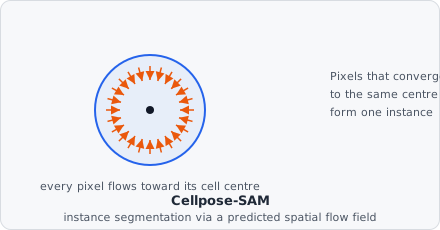
Rather than predicting a shape directly, the model predicts a vector field: at every pixel, “which direction is the centre of my cell?” Simulating each pixel’s short walk along that field causes every pixel belonging to the same cell to converge on the same point - so instances fall out of where pixels end up, which handles irregular and overlapping shapes that a fixed polygon representation (like Stardist’s) can’t.
- Download the model. Ready-to-use Cellpose-SAM TorchScript exports are on the Downloads page - download
cpsam_v2.zipand unzip it; it contains a singlecpsam_v2.ptfile. See Getting a model below if you need a different checkpoint. - Add AI Cellpose Segmentation to the pipeline. Point Model path at the extracted
.ptfile and tune the parameters below. Normalize the image first (e.g. with Enhance Contrast) - see the tip in How it works. - Fill the holes (optional). Cellpose fills the holes inside every object as the last post-processing step. Add Fill Object Holes directly after this command to get the same result.
- Follow with Extract Objects. Append Extract Objects after this command (or after Fill Object Holes) - AI Cellpose Segmentation already writes a per-instance label map, so Extract Objects can turn it straight into object records without a Connected Components/Watershed step in between. From there, Classify Objects assigns the final object class.
Parameters
Section titled “Parameters”| Parameter | Description |
|---|---|
| Model path | Path to a TorchScript-exported Cellpose-SAM model (.pt / .pth, via torch.jit.script or torch.jit.trace). |
| Object class | The segmentation class assigned to every detected object’s pixels. |
| Input channels | Number of input channels the model expects. The grayscale image goes in channel 0; any further channels are zero-filled (or filled with copies of the image, see Replicate gray channel). 2 (cytoplasm + optional nucleus) is standard; 1 is for single-channel exports. Range: 1–3 (default 2), matching Cellpose-SAM’s patch-embedding convolution, which only has weights for up to 3 input channels. |
| Probability threshold | Cell probability above which a pixel takes part in the flow dynamics and can be assigned to an object. Range: 0.0–1.0 (default 0.5 - corresponds to Cellpose’s default logit threshold of 0). |
| Flow iterations | Number of Euler integration steps used to follow the flow field. Higher values let pixels in large cells reach their sink, at the cost of runtime. Range: 1–1000 (default 200, matching Cellpose’s own default). |
| Minimum object size | Minimum instance size in pixels; smaller instances are discarded after the dynamics. 0 disables the filter. Default 15. |
| Max resize | Longest image side, in pixels, the image is scaled down to before segmentation; the masks are scaled back up to the original size afterwards. Smaller values make large cells look like the cell sizes the model was trained on, and are faster. The scale is taken from the full image, so every tile is scaled the same. 0 (default) keeps the full resolution - the Cellpose web demo uses 1000. |
| Flow threshold | Flow error threshold: an object whose shape doesn’t match the flows the model predicted (mean squared error above this value) is removed. Increase to keep more objects, decrease to keep only clean ones. 0 disables the check. Range: 0–10 (default 0.4, matching Cellpose). |
| Cellpose postprocessing | Build the objects from the flows exactly like Cellpose does: pixels follow the interpolated flows, an object only starts where more than 10 pixels end up together, and pixels that reach no such spot become background. Off, every spot any pixel ends up at starts an object, which can join touching cells. Default: on. |
| Replicate gray channel | Copy the gray image into every input channel instead of filling the extra channels with zeros. With Input channels = 3 this matches Cellpose run on an RGB image whose channels are (nearly) equal. Default: on. |
Getting a model
Section titled “Getting a model”Ready-made exports live on the Downloads page: download cpsam_v2.zip, unzip it, and point Model path at the cpsam_v2.pt file inside.
To export a different checkpoint yourself (e.g. a fine-tuned one), use convert_cellpose.py from the EVAnalyzer repository. It rebuilds the Cellpose-SAM network with the cellpose Python package, loads the requested weights, and re-saves them with torch.jit as a .pt file EVAnalyzer can load directly:
pip install "cellpose>=4" torchpython convert_cellpose.py --output cellpose_sam.ptOnly the Cellpose-SAM family (cpsam/cpsam_v2, backbone sam_vitl) is supported - classic Cellpose (v3.x and earlier, the convolutional CPnet architecture) has a different architecture and output layout and isn’t handled by this command or the conversion script. A raw checkpoint downloaded by the cellpose package (or from huggingface.co/mouseland/cellpose-sam) holds only weights with no computation graph, so it can’t be loaded directly either - it has to go through the conversion step above first.
Model requirements
Section titled “Model requirements”The model must accept a [1, C, 256, 256] float tensor, where C matches Input channels, and return a [1, 3, 256, 256] tensor with at least 3 channels, in Cellpose’s spatial-gradient representation:
- Channel 0 - vertical flow (
dY) - Channel 1 - horizontal flow (
dX) - Channel 2 - cell-probability logits (a sigmoid is applied internally; the threshold above is in probability space, not logit space)
Cellpose-SAM’s ViT (SAM) encoder bakes its positional embeddings for a fixed 256×256 token grid at export time, so the exported graph only ever runs at exactly that size. You never need to export at any other resolution - EVAnalyzer pads and splits larger (or smaller) images into overlapping 256×256 tiles internally and blends the results back together (see How it works), so a model traced once at 256×256 handles any input size. Exports that wrap the output in a tuple (e.g. (flows, style)) are also supported - EVAnalyzer uses the first returned tensor with at least 3 channels.
How it works
Section titled “How it works”This is a Rust port of Cellpose’s own dynamics step, with tiling added for Cellpose-SAM’s fixed input size:
- If Max resize is set and the image is larger, it is scaled down so its longest side matches that value.
- The image (with any extra Input channels zero-filled, or filled with copies of the image) is padded and split into overlapping 256×256 tiles - Cellpose-SAM’s ViT encoder only accepts that fixed size. Each tile is run through the model, and the per-tile flow/probability outputs are blended back into one image-sized tensor with a feathered (sigmoid taper) weight per tile, matching Cellpose’s own
transforms.average_tiles, so a segmentation spanning a tile boundary doesn’t show a seam. - Pixels whose cell probability reaches Probability threshold are advected along the flow field for Flow iterations Euler steps (the predicted flow is divided by Cellpose’s training scale factor of 5 to keep each step near one pixel), converging toward the centre (“sink”) of their object.
- Pixels that converge to the same sink are grouped into one instance. With Cellpose postprocessing on, pixels follow the interpolated flow field and an instance only starts where more than 10 pixels end up together, exactly as Cellpose does; pixels reaching no such spot become background.
- Instances whose shape doesn’t match the predicted flows (error above Flow threshold) and instances smaller than Minimum object size are discarded; survivors are renumbered to contiguous instance IDs.
- If the image was scaled down, the masks are scaled back up to the original size and written to the segmentation and instance maps.
Runs on GPU automatically if CUDA is available in the linked libtorch build, otherwise falls back to CPU.
Background
Section titled “Background”Cellpose-SAM combines Cellpose’s flow-field dynamics with a Segment-Anything-based image encoder:
Marius Pachitariu, Michael Rariden, and Carsen Stringer, “Cellpose-SAM: superhuman generalization for cellular segmentation,” bioRxiv, 2025.
Carsen Stringer, Tim Wang, Michalis Michaelos, and Marius Pachitariu, “Cellpose: A Generalist Algorithm for Cellular Segmentation,” Nature Methods, vol. 18, pp. 100-106, 2021.