
Measure Distance To Parent
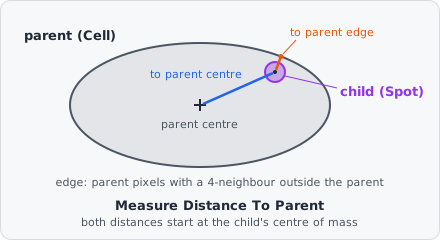
Measure Distance To Parent measures how far each child (e.g. a spot) lies from the parent Relate Objects linked it to (e.g. its cell): from the child’s centre to the parent’s centre, and from the child’s centre to the nearest pixel of the parent’s edge. These are the child-parent distances of CellProfiler’s RelateObjects.
Use it, for example, to tell spots near the nucleus from spots near the cell membrane. It needs a Relate Objects step before it in the pipeline.
Parameters
Section titled “Parameters”| Parameter | Description |
|---|---|
| ID | The step’s ID, unique in the project. Its values’ names in the results start with it (e.g. parent_distance_01). |
| Children | The children measured (e.g. spots). |
| Parent | The class of their parent, as linked by Relate Objects (e.g. Cell). |
Measurements
Section titled “Measurements”Two values per child, in pixels:
| Measurement | Description |
|---|---|
| Distance to parent centre | From the child’s centre to the parent’s centre. |
| Distance to parent edge | From the child’s centre to the nearest edge pixel of the parent. |
Each value also names the parent it was measured to: in the List View, the column … · object next to it holds the parent’s object ID.
How it works
Section titled “How it works”The centre of an object is its centre of mass: the mean position of its pixels, not weighted by intensity.
with the child’s centre and the parent’s.
The parent’s edge pixels are its pixels with at least one of their 4 neighbours (up, down, left, right) outside the parent. A neighbour beyond the image border doesn’t count, so a parent cut off by the border has no edge along it. The distance to the edge is the shortest straight-line distance from the child’s centre to the centre of an edge pixel.
The distance to the edge has no sign: it is the same whether the child’s centre lies inside or outside the parent.
A child without a parent of the chosen class (not linked, or its parent no longer exists) has no value.