
Image Cache
The Image Cache command saves or loads an intermediate image to/from a numbered memory slot.
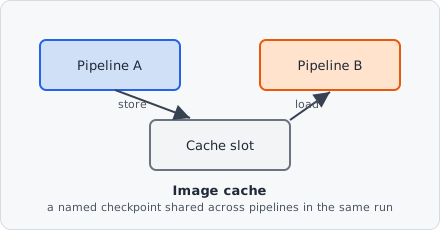
Pipelines in EVAnalyzer normally run independently, each seeing only its own image data - Image Cache is the one mechanism that lets one pipeline hand a processed image to another, so a channel-specific preprocessing result (a background estimate, a mask) can be reused elsewhere instead of being recomputed.
Parameters
Section titled “Parameters”| Parameter | Description |
|---|---|
| Mode | Store - save the current image to the cache; Load - replace the current image with a cached image |
| Address | The slot - see Kinds of slots |
Kinds of slots
Section titled “Kinds of slots”| Kind | Readable by |
|---|---|
| Memory | The steps of this pipeline. |
| Shared | This pipeline and every pipeline after it - also as a pipeline’s image source (Shared memory slot). |
| Module memory | Only inside a module: the slots of one use of the module. |
When to use
Section titled “When to use”Use Image Cache when you need to:
- Re-use an intermediate processing result in a later pipeline step or a different pipeline.
- Pass a pre-processed image to Image Math as the second operand.
Example: background-subtracted signal available for measurement
Section titled “Example: background-subtracted signal available for measurement”- Pipeline A: process the DAPI channel → Store to Shared slot 1.
- Pipeline B (after A): after thresholding the Cy5 channel, use Image Math with Shared slot 1 to create a masked image.
Memory slots are freed at the end of their pipeline, Shared slots once every pipeline has run on the image (tile), Module memory when the module ends. Nothing persists between images.