
Simple Tracker
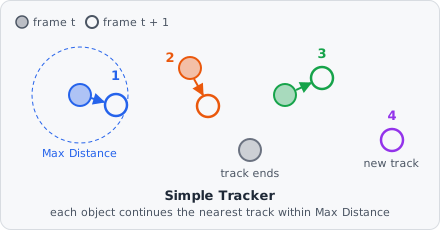
The Simple Tracker links the objects of a time-lapse into tracks: each object in frame t + 1 continues the track of the nearest object in frame t, if that one is close enough and not claimed by an even closer object. Every tracked object gets a Track ID, shown as a column in the results.
It is a dataset step: it runs once after every image has been analysed, on the stored objects of all frames.
The tracks it makes are shown in Results › Tracks: a row per track with its time points, speed and straightness, and its trail on the image.
Parameters
Section titled “Parameters”| Parameter | Description |
|---|---|
| Object Class | The object class to track. |
| Unit | Unit of Max Distance: nm or px. |
| Max Distance | How far an object may move from one frame to the next. Farther apart, it starts a new track. |
How it works
Section titled “How it works”Per image and Z-plane, two consecutive frames are matched by global greedy nearest neighbour:
- All pairs of objects in the two frames that are at most Max Distance apart (measured between the centres of their bounding boxes) are collected.
- The pairs are linked closest first; each object is used only once.
- An object without a partner starts a new track. A frame without objects ends every track.
Track IDs start at 1 and are unique across tracking steps: a second Simple Tracker for another class continues after the IDs the first one gave. Objects that are not tracked have no Track ID.
Limitations
Section titled “Limitations”- No gap closing: an object missing in one frame ends its track, and its reappearance starts a new one.
- No divisions or merges: each object continues at most one track.
- Only project classes can be tracked, not the internal classes of a module.