
Intensity Transform
The Intensity Transform command adjusts pixel intensities using a configurable mathematical transformation.
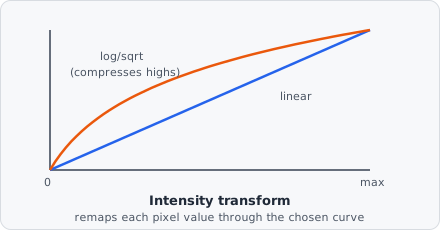
The three modes trace out different curves through the same input→output space: Linear keeps proportions intact (twice as bright stays twice as bright), while Logarithmic and Square root bend the curve to compress the high end and expand the low end - useful when a few very bright pixels would otherwise dominate the visible range and hide dim but real signal.
Parameters
Section titled “Parameters”| Parameter | Description |
|---|---|
| Mode | The transform to apply (see below) |
| Contrast | Multiplicative scaling factor applied after the mode transform |
| Brightness | Additive offset applied after scaling |
Transform Modes
Section titled “Transform Modes”| Mode | Description |
|---|---|
| Linear | output = contrast × input + brightness - simple gain/offset adjustment |
| Logarithmic | output = contrast × log(input + 1) + brightness - compresses bright regions; expands dark regions |
| Square root | output = contrast × sqrt(input) + brightness - moderate compression of bright regions |
When to use
Section titled “When to use”- Linear - correct for systematic over/under-exposure across a batch.
- Logarithmic - useful when signal spans several orders of magnitude (e.g. very dim and very bright objects in the same image).
- Square root - a milder alternative to log when the intensity range is not extreme.