
Object Transform
The Object Transform command applies a geometric transform to every object carrying Input class, keeping the object’s bounding-box centre fixed. Depending on the Output class, the transformed shape either replaces the input object in place or is added as a new, separate object alongside the untouched original.

Parameters
Section titled “Parameters”| Parameter | Description |
|---|---|
| Function | The geometric transform to apply - see below |
| Input class | Objects carrying this class are the input to the transform |
| Output class | If unset (or equal to Input class), the transformed shape replaces the input object in place. If set, a new object carrying this class is created for each transformed object instead, leaving the input object untouched |
Functions
Section titled “Functions”| Function | Description |
|---|---|
| Scale | Scales the object by a unitless factor. Shape is preserved; the object is only shrunk or expanded around its centre |
| Snap area | Draws a circle around the object’s bounding box, enlarged by Extra size (in the chosen Unit) on top of the bounding-box diameter |
| Min circle | Draws a circle around the object’s bounding box, using Min diameter as a lower bound - the circle never shrinks below the object’s own bounding box |
| Draw circle | Draws a circle with exactly Diameter as its diameter. If Diameter is 0, the object’s bounding box is used instead |
| Fitting ellipse | Replaces the object with the ellipse fitted to its mask, scaled by Scale (values ≤ 1.0 have no effect) |
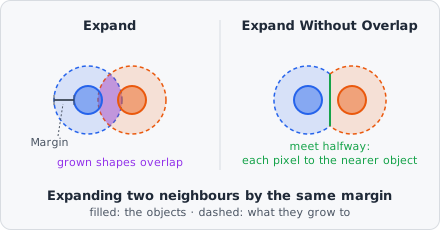
| Expand | Grows the object outward by Margin (in the chosen Unit), following its actual contour uniformly. Unlike Scale, irregular shapes grow by a flat margin rather than proportionally. Neighbouring objects may grow into each other |
| Expand Without Overlap | Grows the objects outward by at most Margin (in the chosen Unit) without growing into each other - see Expand Without Overlap |
| Shrink | Shrinks the object inward by Margin, following its actual contour. Objects that vanish after shrinking are removed |
Snap area, Min circle, Draw circle, Expand, Expand Without Overlap and Shrink express their size in a configurable Unit: nm (the default, uses the pixel size) or px.
Expand Without Overlap
Section titled “Expand Without Overlap”Expand Without Overlap grows all objects of Input class together, as CellProfiler’s ExpandOrShrinkObjects (“Expand objects by a specified number of pixels”) does:
- Every pixel that belongs to none of the input objects and lies within Margin of one (straight-line distance to its nearest object pixel) goes to the nearest object.
- Where two objects grow towards each other, they meet halfway and don’t overlap. A pixel exactly as far from two objects goes to one of them, the same one as in CellProfiler.
- With a large Margin, the objects grow until they touch - every pixel in reach goes to its nearest object, much like Voronoi, but measured from the object’s outline instead of its centre.
- In nm, the margin is converted to pixels with the mean of the x and y pixel size and may be fractional: 2.5 px also reaches the diagonal neighbour 2 px across and 1 px down.
Only the input objects block each other. Objects of other classes are ignored - the grown objects may cover them.
Behaviour Notes
Section titled “Behaviour Notes”- The transform keeps the object’s bounding-box centre fixed - only the shape and/or size change. Expand and Expand Without Overlap grow along the outline instead, and the centre can move where a neighbour stops the growth.
- A transformed shape that would extend past the image border is clipped, and the resulting object is flagged as touching the edge (same as any other object at the image boundary).
- Only objects carrying Input class are processed; objects without that class are left untouched.
Example: Approximating a cell area around each nucleus
Section titled “Example: Approximating a cell area around each nucleus”Function: Min circle Min diameter: 30000 Unit: nmInput class: dapi@nucleusOutput class: cell@areaThis creates a new cell@area object around every detected nucleus, at least 30 µm (30000 nm) in diameter, without modifying the original nucleus objects - useful as a quick cell-area proxy when no cell-surface stain is available (compare with Voronoi for a partition-based alternative).
Where nuclei lie close together, these circles overlap. Expand Without Overlap gives each nucleus a cell area that stops at its neighbours; with a cell or membrane stain, Propagation follows the stain instead. Neither links the new objects to their nucleus - use Relate Objects for that.