
Track Kalman
Track Kalman links the objects of a time-lapse into tracks by the globally best assignment, predicting each track’s next position from its velocity - for objects moving in a direction (directed motion, e.g. vesicles transported along microtubules). Like Track LAP, it closes gaps and, if switched on, detects merges and splits. Every tracked object gets a Track ID, shown as a column in the results.
It is a dataset step: it runs once after every image has been analysed, on the stored objects of all frames.
The tracks it makes are shown in Results › Tracks: a row per track with its time points - and, with a Measure Track Motion step after it, how far it moved, its speed and straightness -, its trail on the image and - with merges and splits - its parent and child tracks.
Parameters
Section titled “Parameters”| Parameter | Description |
|---|---|
| Object Class | The object class to track. |
| Unit | Unit of the distances: nm (default) or px. |
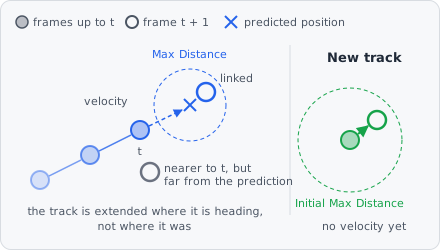
| Initial Max Distance | How far a new track’s second object may be from its first - the fastest an object moves per frame. Default 15000. |
| Max Distance | How far an object may be from where its track predicts it - also the farthest a merge or split partner may be. Default 5000. |
| Max Gap Frames | How many frames in a row an object may be missing and its track still continue. 0: no gap closing. Default 2, range 0-100. |
| Max Gap Distance | How far an object may be from where its track predicts it after a gap. Default 10000. |
| Position Noise | (advanced) How exactly an object’s position is known (its standard deviation) - the larger, the more the predictions follow the velocity rather than the last position. Default 200. |
| Velocity Noise | (advanced) How much the velocity changes from one frame to the next (standard deviation) - the larger, the faster a track follows a turn. Default 1000. |
| Merging | Detect two objects merging into one (e.g. vesicle fusion). Off by default. |
| Splitting | Detect one object splitting into two (e.g. a vesicle budding off). Off by default. |
| Merge Split Amount | (advanced) What a merge adds up and a split divides: Area or Intensity (default Intensity) - see Merge Split Amount. |
| Channel | (advanced) The channel of the intensity, if Merge Split Amount is Intensity. |
With an impossible value the step stops with an error: The maximum distances must be greater than 0; Position Noise must be greater than 0, Velocity Noise at least 0.
How it works
Section titled “How it works”Per image and Z-plane, tracking runs in two steps, both solved as a global linear assignment problem (Jaqaman et al., 2008), so every link competes with all others instead of being taken closest first:
- Frame to frame: the tracks ending in frame t are linked to the objects of frame t + 1 so that the summed cost is smallest, each object once. A link costs the squared distance to the position the track predicts. Every track carries a Kalman filter per axis with a constant-velocity model: per frame the position moves by the velocity, the velocity changes at random by Velocity Noise, and the measured positions are off by Position Noise. A new track has no velocity yet: its second object is looked for within Initial Max Distance around the first.
- Gaps, merges and splits: a track’s end is linked to another track’s start up to Max Gap Frames missing frames later (gap closing). With Merging, a track’s end can also run into the middle of another track in the next frame; with Splitting, a track’s start can come out of the middle of another one in the frame before. Gap closing predicts across the missing frames. Merges and splits are scored as in Track LAP - by distance, without prediction - see Merge Split Amount.
Not linking costs 1.05 times the highest cost a link may have, so any possible link beats no link, and the links only compete with each other.
What the links make of the tracks:
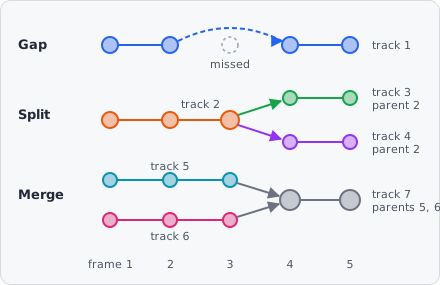
- A closed gap continues the track.
- A merge ends both tracks and starts a new one, with both as its parents.
- A split ends the track and starts two - its continuation and the new object - each with the old track as parent.
The parents are stored with the tracks and shown in Results › Tracks as lineage (divisions and fusions). Positions are the centres of the objects’ bounding boxes. Track IDs are unique across tracking steps: a second tracking step for another class continues after the IDs the first one gave. Objects that are not tracked have no Track ID.
Merge Split Amount
Section titled “Merge Split Amount”A merge adds two objects up and a split divides one - Merge Split Amount says what, to tell a true merge or split from objects that only pass close by:
| Merge Split Amount | For |
|---|---|
| Area | Objects that keep their size (e.g. cells). |
| Intensity | The summed intensity of Channel (mean × area): for spots below the resolution limit (e.g. vesicles), whose brightness adds up but whose size doesn’t. |
References
Section titled “References”- Jaqaman K. et al., “Robust single-particle tracking in live-cell time-lapse sequences,” Nature Methods, vol. 5, pp. 695-702, 2008. doi:10.1038/nmeth.1237
- Jonker R. & Volgenant A., “A shortest augmenting path algorithm for dense and sparse linear assignment problems,” Computing, vol. 38, pp. 325-340, 1987. doi:10.1007/BF02278710
- Kalman R. E., “A New Approach to Linear Filtering and Prediction Problems,” Journal of Basic Engineering, vol. 82, pp. 35-45, 1960. doi:10.1115/1.3662552
Limitations
Section titled “Limitations”- Only project classes can be tracked, not the internal classes of a module.