
Rolling Ball
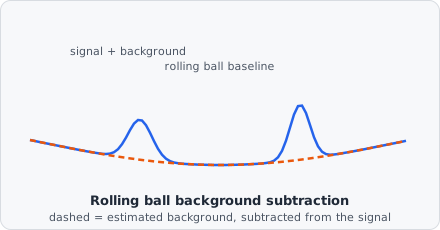
The Rolling Ball command removes uneven background illumination. A virtual ball or paraboloid rolls beneath the image surface; the computed local background is subtracted from the original image, leaving only the foreground signal.
Picture the image as a 3D landscape where pixel intensity is height. A ball too big to fit inside the sharp peaks (your actual objects) rolls along underneath them, tracing out only the slow, sweeping curves of the background illumination - which is exactly the baseline that gets subtracted.
When to use
Section titled “When to use”Use Rolling Ball as the first preprocessing step when images have uneven or sloped background intensity - common in widefield fluorescence microscopy.
Parameters
Section titled “Parameters”| Parameter | Description |
|---|---|
| Radius | Radius of the rolling ball in pixels |
| Ball type | Shape of the virtual probe: Ball (spherical cap) or Paraboloid |
| Pre-smooth | Apply a light Gaussian blur before background estimation to reduce sensitivity to noise |
Ball type
Section titled “Ball type”| Type | Behaviour |
|---|---|
| Ball | Traditional ImageJ algorithm. Best for images with distinct, round objects. |
| Paraboloid | Smoother at the edges; fewer artefacts on complex gradients. Recommended for most microscopy images. |
Background
Section titled “Background”The algorithm was originally described by Stanley R. Sternberg, “Biomedical Image Processing,” IEEE Computer, vol. 16, no. 1, pp. 22-34, January 1983, and ported from the ImageJ/NIH Image Pascal implementation.