
Image Intensity
Image Intensity measures the brightness of one channel over the whole image: total, mean, standard deviation, minimum, maximum, median, lower and upper quartile and the median absolute deviation. It uses every pixel of the image, the background too - unlike the intensity metrics of an object, which use only the object’s pixels.
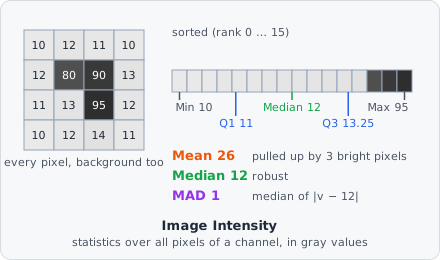
It is a measurement step: it runs once per image plane, after all tiles of the image are read, and gives one set of values per plane.
Parameters
Section titled “Parameters”| Parameter | Description |
|---|---|
| ID | The step’s ID, unique in the project. It is given automatically (intensity_01, …) and starts the names of its values in the results. |
| Channel | The channel to measure. |
Measurements
Section titled “Measurements”Nine values per image plane, all in gray values (like the objects’ intensities). Each name ends with the channel, e.g. “Mean intensity (channel 0)”.
| Measurement | Unit | Description |
|---|---|---|
| Total intensity | gray value | The sum of all pixels. |
| Mean intensity | gray value | The mean of all pixels. |
| Standard deviation of intensity | gray value | How far the pixels spread around the mean. |
| Minimum intensity | gray value | The darkest pixel. |
| Maximum intensity | gray value | The brightest pixel. |
| Median intensity | gray value | Half the pixels are darker, half brighter. |
| Lower quartile intensity | gray value | A quarter of the pixels are darker. |
| Upper quartile intensity | gray value | A quarter of the pixels are brighter. |
| Median absolute deviation of intensity | gray value | The median distance of the pixels to the median - a spread that a few bright pixels do not change. |
How it works
Section titled “How it works”Over the pixels of the channel as it is loaded from the image - filters earlier in the pipeline do not change it. An RGB image is turned into its luminance first.
The standard deviation is that of the population: all pixels are measured, not a sample of them.
The median and quartiles are taken from a histogram of the pixels, one bin per gray value (above 16 bits, 65 536 bins over the range). Between two pixels they are interpolated linearly, as NumPy’s percentile does: the quantile lies at rank of the sorted pixels.
Pixels that are not numbers are left out. An image without pixels gets no values.
Results
Section titled “Results”The values belong to the image plane, not to an object. In the List view they are under Columns › Measurements, named “intensity_01 · Mean intensity (channel 0)”. With A row per: Images each image shows its own value; with A row per: Objects each object row shows the value of its image plane. In the Plate view a well gets the statistic over its images’ values; images left out are not counted.
The export option Measurements - one row per value writes them with one row per value - see Exporting Results.
Use them, for example, to normalise the objects’ intensities by the image’s background (the median of a sparse image), or with Exclude Image to leave out images that are too dark.