
Fill Object Holes
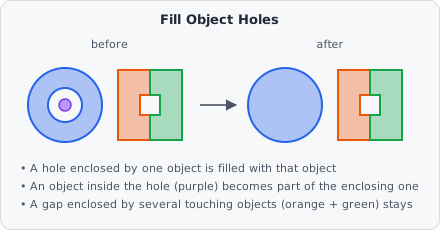
The Fill Object Holes command fills the holes inside each object individually. Unlike Fill Holes, which works on the segmentation map before objects exist, it works on the objects (the instance map) - so it knows which object a hole belongs to.
Parameters
Section titled “Parameters”Fill Object Holes has no configurable parameters.
How it works
Section titled “How it works”- A pixel becomes part of an object when it is enclosed by that object alone.
- A gap enclosed by several touching objects together is left as it is - it belongs to none of them.
- An object lying completely inside another object’s hole becomes part of the enclosing object.
- Filled pixels get the class of the object they now belong to.
Pipeline position
Section titled “Pipeline position”The command needs objects, so it comes after a step that creates them and before Extract Objects:
AI Cellpose / AI Stardist Segmentation ─┐Watershed / Connected Components ───────┼─→ Fill Object Holes → Extract Objects → Classify ObjectsWhen to use
Section titled “When to use”- After AI Cellpose Segmentation: Cellpose itself fills the holes inside every object as the last step of its post-processing. Add Fill Object Holes directly after the Cellpose step to get the same result as the Cellpose GUI.
- After Watershed or Connected Components when objects touch: Fill Holes on the segmentation map would also fill the gaps between touching objects, Fill Object Holes doesn’t.
Use Fill Holes instead when you want to close holes in the segmentation map right after a Threshold, before objects are created.