
Blur
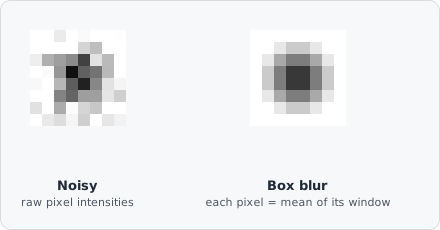
The Blur command applies a box (mean) filter to the image. Every pixel is replaced by the average intensity of its surrounding neighbourhood.
Because every pixel in the window contributes equally, a box blur is the cheapest possible smoothing operation - just a running average - which makes it fast, but it can also leave faint rectangular “ringing” artifacts around sharp edges that a distance-weighted kernel like Gaussian Blur avoids.
When to use
Section titled “When to use”Use Blur as a fast, lightweight noise-reduction step before segmentation. For better edge preservation, consider Gaussian Blur instead.
Parameters
Section titled “Parameters”| Parameter | Description |
|---|---|
| Kernel size | Side length of the averaging kernel in pixels (must be odd; range 3–27) |
Kernel size guidance
Section titled “Kernel size guidance”- 3–5 - subtle smoothing, preserves fine structure
- 7–11 - moderate noise reduction for typical fluorescence images
- 13+ - heavy smoothing; fine structures may be lost
In image processing, a kernel (convolution matrix) is a small matrix applied to each pixel and its neighbours. A box blur kernel fills every element with 1/N, replacing each pixel with the neighbourhood mean.