
Area Occupied
Area Occupied measures how much of the image the objects of one class cover: the covered area in pixels, in µm² (when the pixel size is known) and as a part of the image (0 to 1). Where objects of the class overlap, the shared pixels count once.
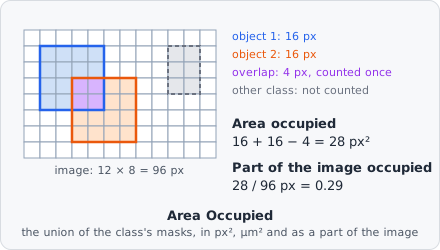
It is a measurement step: it runs once per image plane, after all objects of the image are found, and gives one value per plane - not one per object.
Parameters
Section titled “Parameters”| Parameter | Description |
|---|---|
| ID | The step’s ID, unique in the project. It is given automatically (area_occupied_01, …) and starts the names of its values in the results. |
| Object Class | The objects whose area is measured. It must be set. |
Measurements
Section titled “Measurements”Three values per image plane:
| Measurement | Unit | Description |
|---|---|---|
| Area occupied | px² | The number of pixels at least one object of the class covers. |
| Area occupied | µm² | The same area in µm². No value when the image has no pixel size. |
| Part of the image occupied | 0-1 | The covered pixels divided by the pixels of the image. |
The two Area occupied values differ by their unit; in the measurement pickers they read “area_occupied_01 · Area occupied (px²)” and “(µm²)”.
How it works
Section titled “How it works”Only the pixels of the objects’ masks are counted, not their bounding boxes: a hole in an object is not covered. The masks are merged row by row, so a pixel covered by several objects counts once:
with the pixel size in nm and the number of pixels analysed: all tiles of the image (in a preview, the part that is shown).
Results
Section titled “Results”The values belong to the image plane, not to an object. In the List view they are under Columns › Measurements, named “area_occupied_01 · Area occupied”. With A row per: Images each image shows its own value; with A row per: Objects each object row shows the value of its image plane. In the Plate view a well gets the statistic over its images’ values; images left out are not counted.
The export option Measurements - one row per value writes measurements.csv / .xlsx with one row per value (image, plane, step, measurement, unit, key, value) - see Exporting Results.
Limitations
Section titled “Limitations”- One class per step. To measure several classes, add a step for each.
- Values are per plane; there is no total over a z-stack or a time-lapse.