
Measure Object Neighbors
Measure Object Neighbors measures for each object how many objects are near it and how close the nearest ones are: the number of neighbours, the percentage of its outline that touches them, the distance to its first and second closest object, and the angle between those two. It follows CellProfiler’s MeasureObjectNeighbors.
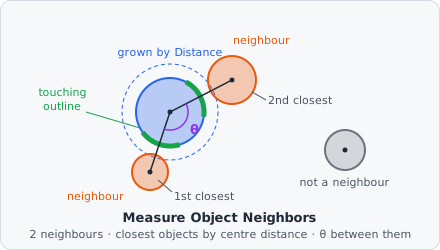
Use it to tell isolated cells from cells in a dense cluster, or to measure the spacing of spots.
Parameters
Section titled “Parameters”| Parameter | Description |
|---|---|
| ID | The step’s ID, unique in the project. Its values’ names in the results start with it (e.g. neighbors_01). |
| Objects | The objects measured. |
| Neighbors | The objects that count as neighbours. Unset: the measured objects themselves (each object’s neighbours among its own class). |
| Neighbors are | Which objects count as neighbours: Expand until adjacent (default), Adjacent or Within a distance. |
| Distance [px] | With Within a distance: how far, in pixels (1 to 1000, default 5). |
Measurements
Section titled “Measurements”Five values per object:
| Measurement | Unit | Description |
|---|---|---|
| Neighbors | count | The number of neighbours. |
| Percent touching | % | The part of the object’s outline that lies next to a neighbour. |
| First closest distance | px | The distance between the object’s centre and the centre of the closest object. |
| Second closest distance | px | The same for the second closest object. |
| Angle between neighbors | degrees | The angle at the object’s centre between the lines to the first and second closest object (0-180). |
The two distances each name the object they are to: in the List View, the column … · object next to them holds that object’s ID.
How it works
Section titled “How it works”Neighbours
Section titled “Neighbours”The object is grown by a disk (all offsets with ). Every other object the grown object reaches is a neighbour, each counted once. The radius depends on Neighbors are:
- Within a distance: = Distance [px]. Objects up to that many pixels apart are neighbours.
- Adjacent: = 1. Only objects that touch, at most 1 px apart, are neighbours.
- Expand until adjacent: first every measured object is grown over the background until it meets the others: each background pixel of the image goes to its nearest object, like a Voronoi split of the background. Then the grown objects that touch ( = 1) are neighbours. So each object has neighbours however far apart they lie, unless it is alone. With a different Neighbors class, only the measured objects are grown; the neighbour objects keep their shape.
Percent touching
Section titled “Percent touching”The outline of the object is its pixels that have a pixel of another object or of the background among their 8 neighbours, or that lie on the image border. An outline pixel is touching if a pixel of a neighbour object lies within of it.
With Expand until adjacent, this is the outline of the grown object.
Closest objects and angle
Section titled “Closest objects and angle”The centre of an object is its centre of mass (the mean position of its pixels). The first and second closest objects are the two whose centres are nearest to the object’s centre, among all objects of the Neighbors class, no matter whether they count as neighbours above. Equally near objects are taken in a fixed order.
The angle is between the two lines from the object’s centre to these two centres:
in degrees, from 0 (both in the same direction) to 180 (on opposite sides).
An object without any other object has 0 neighbours and no distances. With only one other object there is no second closest distance and no angle.
The command runs on the whole image at once, so neighbours across tile borders are found.
Limitations
Section titled “Limitations”- Expand until adjacent needs the whole image in memory at once and stops with an error on images of more than 134 million pixels (128 × 1024 × 1024, about 11,585 × 11,585 px). Use Within a distance for whole slides.
- Distances are in pixels.
- Where measured objects overlap, the shared pixels count for only one of them.