
Color Deconvolution
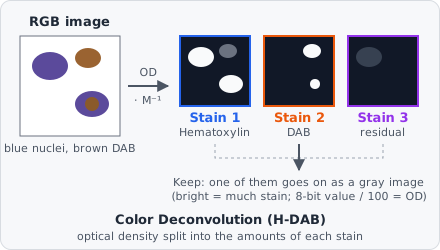
Color Deconvolution separates a brightfield RGB image into its stains - Hematoxylin, DAB, Eosin or stains of your own - and keeps one of them as a gray image: how much of the stain each pixel holds. It is Ruifrok & Johnston’s colour deconvolution, written from their paper.
When to use
Section titled “When to use”Use it on immunohistochemistry or histology slides before a Threshold or a measurement. For IHC, Stain 2 of H-DAB is the DAB (brown) signal: threshold it, or measure the DAB per nucleus found on Stain 1. A Color Filter picks pixels by their hue; colour deconvolution instead gives each pixel an amount of each stain, even where two stains overlap.
The step needs an RGB image. A gray image (a single channel) stops the step with an error.
Parameters
Section titled “Parameters”| Parameter | Description |
|---|---|
| Stains | The stains on the slide. H-DAB (default): Hematoxylin and DAB. H&E: Hematoxylin and Eosin. H-E-DAB: Hematoxylin, Eosin and DAB. Custom: your own stain vectors. |
| Stain 1 Red / Green / Blue … Stain 3 Red / Green / Blue | Only with Custom: the optical density of each stain in red, green and blue (0 to 1), e.g. measured on a single-stained slide. The defaults are Hematoxylin (0.650, 0.704, 0.286) and DAB (0.268, 0.570, 0.776). Stain 3 all 0 (default): the residual. |
| Keep | The stain the step passes on: Stain 1 (Hematoxylin) (default), Stain 2 (DAB / Eosin) or Stain 3 (DAB in H-E-DAB / residual). |
| Background (white) | Advanced. The brightness of empty glass (no tissue), 0 to 255 whatever the image’s bit depth (default 255). Lower it when the scanner’s background isn’t pure white. |
The stains of each preset
Section titled “The stains of each preset”| Stains | Stain 1 | Stain 2 | Stain 3 |
|---|---|---|---|
| H-DAB | Hematoxylin | DAB | residual |
| H&E | Hematoxylin | Eosin | residual |
| H-E-DAB | Hematoxylin | Eosin | DAB |
The stain vectors are the ones measured by Ruifrok & Johnston (table 1 of the paper); H&E uses their Hematoxylin and Eosin vectors for H&E.
How it works
Section titled “How it works”Light passing a stain is absorbed by the Beer-Lambert law, so in optical density the stains add up. Each pixel’s intensity in red, green and blue (0 to 1) is turned into an optical density against the background = Background (white) / 255:
A pixel brighter than the background counts as background (OD 0); a pixel darker than 1/255 of it counts as 1/255 (OD 2.41), so black pixels stay finite.
Each stain is a vector of the optical densities it gives in red, green and blue, scaled to length 1. The three vectors are the rows of a matrix ; a pixel’s stain amounts are its optical densities times the inverse:
With only two stains, the third vector is the one perpendicular to both - the residual: what neither stain explains. It is high where the stain vectors don’t fit the slide.
The kept amount is divided by 2.55 and clipped to 0 to 1: 0 is no stain, 1 is an optical density of 2.55 or more. On the 0 to 255 scale of an 8-bit image, the value divided by 100 is the optical density (100 = OD 1.0). Real stains rarely go past OD 2.5 (nearly black).
Limitations
Section titled “Limitations”- Stains with the same colour (or a custom stain that is all 0) can’t be told apart: the step stops with an error.
- The preset vectors are measured values; stains on your slides may differ. A bright Stain 3 in H-DAB or H&E shows where they don’t fit - measure your own on single-stained slides and use Custom.
- The output is an amount of stain, not a calibrated concentration: the optical density of DAB is not strictly proportional to the antigen.
Reference
Section titled “Reference”Ruifrok, A. C. & Johnston, D. A. (2001). Quantification of histochemical staining by color deconvolution. Analytical and Quantitative Cytology and Histology 23(4), 291-299.