
Translate Image
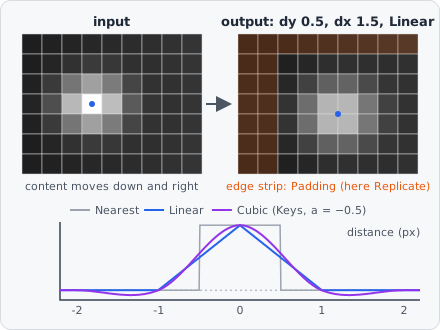
Translate Image shifts the image by a fraction of a pixel. The image keeps its size; the strip the shift empties at the edge is filled as set under Padding. Use it for a fixed shift between two channels of a microscope (chromatic shift, a second camera), or to align a channel before it is combined with another, e.g. in Image Math.
To shift a reference channel onto the target and subtract it, with the shift estimated per image, use Subtract Reference Channel.
In a project file it is TRANSLATE_IMAGE.
Parameters
Section titled “Parameters”| Parameter | Description |
|---|---|
| Dy | Shift down (+) or up (−) in pixels, fractions allowed. Default 0, -1000 to 1000. |
| Dx | Shift right (+) or left (−) in pixels, fractions allowed. Default 0, -1000 to 1000. |
| Interpolation | How the values between pixels are computed. Nearest: the nearest pixel (the only choice for label images). Linear (default): bilinear, from the 4 nearest pixels. Cubic: bicubic, from the 16 nearest pixels - sharper than Linear, may over- and undershoot at edges. |
| Padding | What fills the strip the shift empties at the edge. Replicate (default): the edge pixel repeated. Reflect: mirrored at the edge without repeating the edge pixel (…, 2, 1, 0, 1, 2, …). Constant: the Pad Value. |
| Pad Value | (advanced) The fill value for Padding Constant. Default 0. |
How it works
Section titled “How it works”Positive moves the content down, positive to the right - the convention of scipy.ndimage.shift, so shifts measured in Python can be used as they are.
The shift is the same for every pixel, so are the interpolation weights. Each axis has one kernel: one tap for Nearest or a whole-pixel shift, two for Linear ( and , with the fraction of the shift), four for Cubic. Cubic is Keys’ cubic convolution with (Catmull-Rom):
The rows are interpolated first, then the columns. A whole-pixel shift copies the pixels, whatever the interpolation, so it doesn’t blur. A volume is shifted plane by plane, a colour image the same in every colour.
Limitations
Section titled “Limitations”- Label images can only be shifted with Nearest; Linear or Cubic stop the step with an error.
- The shift must be smaller than the image.
- It runs per tile: on an image split into tiles (larger than 4096 px), the padding also fills a strip at the inner tile borders, as wide as the shift.
In a project file
Section titled “In a project file”{ "type": "TRANSLATE_IMAGE", "dy": 0.5, "dx": -1.25, "interpolation": "CUBIC", "padding": "REPLICATE", "padValue": 0.0 }A script runs it as run("translate_image", image, #{ dy: 0.5, dx: -1.2 }).
References
Section titled “References”- Keys R., “Cubic convolution interpolation for digital image processing,” IEEE Transactions on Acoustics, Speech, and Signal Processing, vol. 29, pp. 1153-1160, 1981. doi:10.1109/TASSP.1981.1163711