
Color to Grayscale
Color to Grayscale turns a colour (RGB) image into a gray image: one value per pixel instead of red, green and blue. Most commands that follow - Threshold, Hessian, Find Maxima, … - need one value per pixel. A gray image passes through unchanged, so the same pipeline works for colour and gray images.
When to use
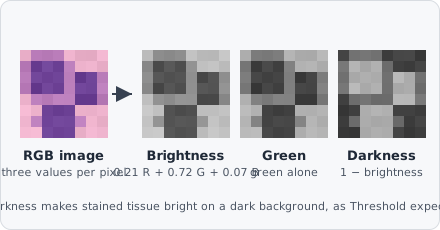
Section titled “When to use”Use it at the start of a pipeline on RGB images - brightfield slides, histology, photos - before a segmentation. On brightfield slides the objects are darker than the empty glass: Darkness makes them bright on a dark background, as Threshold expects.
To separate stains (Hematoxylin, DAB, Eosin), use Color Deconvolution instead; to keep only one colour range, use Color Filter.
Parameters
Section titled “Parameters”| Parameter | Description |
|---|---|
| Method | How the red, green and blue of a pixel become one gray value (default Brightness) |
Methods
Section titled “Methods”| Method | Gray value |
|---|---|
| Brightness | The brightness as the eye sees it: 0.2126 R + 0.7152 G + 0.0722 B (ITU-R BT.709) - the same value the intensities of a colour image are measured with |
| Red | The red channel alone |
| Green | The green channel alone - often the best contrast in H&E |
| Blue | The blue channel alone |
| Average | (R + G + B) / 3 |
| Maximum | The brightest of R, G and B per pixel - the HSV value that Color Filter uses |
| Darkness | 1 − brightness: stained tissue bright on a dark background - for brightfield slides |
- The output is a gray image from 0 to 1, whatever the bit depth of the image.
- With Brightness, a threshold on the gray image and a measurement of the colour image use the same values.