
Track Overlap
Track Overlap links the objects of a time-lapse into tracks by how much their masks overlap - for large objects that move less than their size from frame to frame (e.g. cells), where no distance needs to be chosen. Like Track LAP, it closes gaps and, if switched on, detects merges and splits (e.g. cell division). Every tracked object gets a Track ID, shown as a column in the results.
It is a dataset step: it runs once after every image has been analysed, on the stored objects of all frames.
The tracks it makes are shown in Results › Tracks: a row per track with its time points - and, with a Measure Track Motion step after it, how far it moved, its speed and straightness -, its trail on the image and - with merges and splits - its parent and child tracks.
Parameters
Section titled “Parameters”| Parameter | Description |
|---|---|
| Object Class | The object class to track. |
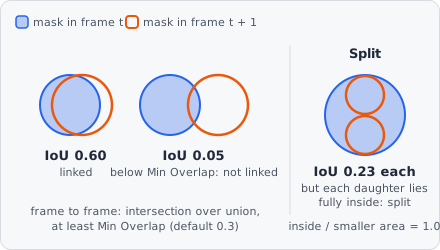
| Min Overlap | How much two objects must overlap to be linked: intersection over union, from 0 to 1 (1: the same mask). For a merge or split, the part of the smaller object inside the bigger one. Default 0.3, range 0.01-1. |
| Max Gap Frames | How many frames in a row an object may be missing and its track still continue. 0: no gap closing. Default 2, range 0-100. |
| Merging | Detect two objects merging into one. Off by default. |
| Splitting | Detect one object splitting into two (e.g. cell division). Off by default. |
| Merge Split Amount | (advanced) What a merge adds up and a split divides: Area or Intensity (default Area) - see Merge Split Amount. |
| Channel | (advanced) The channel of the intensity, if Merge Split Amount is Intensity. |
With an impossible value the step stops with an error: Min Overlap must be greater than 0 and at most 1.
How it works
Section titled “How it works”Per image and Z-plane, tracking runs in two steps, both solved as a global linear assignment problem (Jaqaman et al., 2008), so every link competes with all others instead of being taken closest first:
- Frame to frame: the tracks ending in frame t are linked to the objects of frame t + 1 so that the summed cost is smallest, each object once. A link costs 1 − IoU (intersection over union of the two masks); objects that overlap less than Min Overlap are not linked. Without stored masks (Keep object outlines in the results off), the bounding boxes are compared instead.
- Gaps, merges and splits: a track’s end is linked to another track’s start up to Max Gap Frames missing frames later (gap closing). With Merging, a track’s end can also run into the middle of another track in the next frame; with Splitting, a track’s start can come out of the middle of another one in the frame before. Merges and splits compare the smaller object with the bigger one instead - a daughter covers at most half of its mother, but nearly all of it lies inside her: they cost 1 − intersection / smaller area, times the penalty of Merge Split Amount.
Not linking costs 1.05 times the highest cost a link may have, so any possible link beats no link, and the links only compete with each other.
What the links make of the tracks:
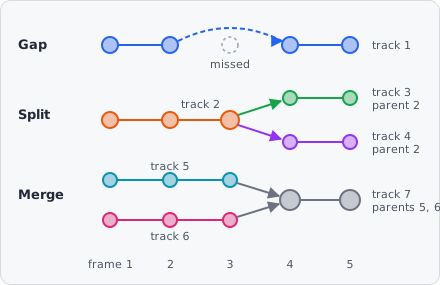
- A closed gap continues the track.
- A merge ends both tracks and starts a new one, with both as its parents.
- A split ends the track and starts two - its continuation and the new object - each with the old track as parent.
The parents are stored with the tracks and shown in Results › Tracks as lineage (divisions and fusions). Positions are the centres of the objects’ bounding boxes. Track IDs are unique across tracking steps: a second tracking step for another class continues after the IDs the first one gave. Objects that are not tracked have no Track ID.
Merge Split Amount
Section titled “Merge Split Amount”A merge adds two objects up and a split divides one - Merge Split Amount says what, to tell a true merge or split from objects that only pass close by:
| Merge Split Amount | For |
|---|---|
| Area | Objects that keep their size (e.g. cells). |
| Intensity | The summed intensity of Channel (mean × area): for spots below the resolution limit (e.g. vesicles), whose brightness adds up but whose size doesn’t. |
References
Section titled “References”- Jaqaman K. et al., “Robust single-particle tracking in live-cell time-lapse sequences,” Nature Methods, vol. 5, pp. 695-702, 2008. doi:10.1038/nmeth.1237
- Jonker R. & Volgenant A., “A shortest augmenting path algorithm for dense and sparse linear assignment problems,” Computing, vol. 38, pp. 325-340, 1987. doi:10.1007/BF02278710
Limitations
Section titled “Limitations”- Only project classes can be tracked, not the internal classes of a module.