Object Transform
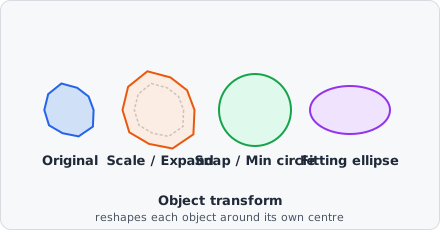
The Object Transform command applies a geometric transform to every object carrying Input class, keeping the object’s bounding-box centre fixed. Depending on the Output class, the transformed shape either replaces the input object in place or is added as a new, separate object alongside the untouched original.
Parameters
Section titled “Parameters”| Parameter | Description |
|---|---|
| Function | The geometric transform to apply - see below |
| Input class | Objects carrying this class are the input to the transform |
| Output class | If unset (or equal to Input class), the transformed shape replaces the input object in place. If set, a new object carrying this class is created for each transformed object instead, leaving the input object untouched |
Functions
Section titled “Functions”| Function | Description |
|---|---|
| Scale | Scales the object by a unitless factor. Shape is preserved; the object is only shrunk or expanded around its centre |
| Snap area | Draws a circle around the object’s bounding box, enlarged by Extra size (in the chosen Unit) on top of the bounding-box diameter |
| Min circle | Draws a circle around the object’s bounding box, using Min diameter as a lower bound - the circle never shrinks below the object’s own bounding box |
| Draw circle | Draws a circle with exactly Diameter as its diameter. If Diameter is 0, the object’s bounding box is used instead |
| Fitting ellipse | Replaces the object with the ellipse fitted to its mask, scaled by Scale (values ≤ 1.0 have no effect) |
| Expand | Grows the object outward by Margin (in the chosen Unit), following its actual contour uniformly. Unlike Scale, irregular shapes grow by a flat margin rather than proportionally |
| Shrink | Shrinks the object inward by Margin, following its actual contour. Objects that vanish after shrinking are removed |
Snap area, Min circle, Draw circle, Expand, and Shrink express their size in a configurable Unit (e.g. px, nm, µm).
Behaviour Notes
Section titled “Behaviour Notes”- The transform keeps the object’s bounding-box centre fixed - only the shape and/or size change.
- A transformed shape that would extend past the image border is clipped, and the resulting object is flagged as touching the edge (same as any other object at the image boundary).
- Only objects carrying Input class are processed; objects without that class are left untouched.
Example: Approximating a cell area around each nucleus
Section titled “Example: Approximating a cell area around each nucleus”Function: Min circle Min diameter: 30 Unit: µmInput class: dapi@nucleusOutput class: cell@areaThis creates a new cell@area object around every detected nucleus, at least 30 µm in diameter, without modifying the original nucleus objects - useful as a quick cell-area proxy when no cell-surface stain is available (compare with Voronoi for a partition-based alternative).