ROI Math
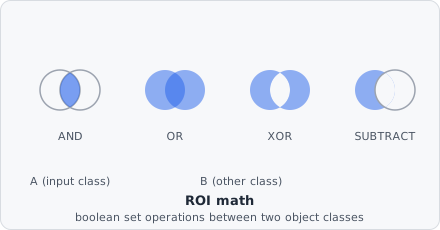
The ROI Math command performs a pixel-level boolean set operation between two object classes — an Input class (“A”) and an Other class (“B”) — and writes the result into an Output class. It is used to derive new object shapes from the combination of existing segmented regions, for example to subtract a nucleus mask from a whole-cell mask to isolate cytoplasm, or to restrict spots to the interior of another object.
When multiple Other class objects overlap a single Input class object, they are first unified into one combined “B” mask before the operation is applied.
Parameters
Section titled “Parameters”| Parameter | Description |
|---|---|
| Operation | The boolean set operation to apply — see Operations below |
| Input class | The “A” object set. Each object in this class is processed individually |
| Other class | The “B” object set. All overlapping objects of this class are unioned before the operation |
| Other filter classes | Additional classes used to restrict which Other class objects are considered — leave empty to use all Other class objects |
| Min overlap area | Minimum overlap area (in the chosen Unit) required before a B object is considered to overlap an A object |
| Output class | Class assigned to the resulting shape |
| Keep unmatched | When enabled, input objects that have no overlapping B objects are preserved unchanged in the output class |
Operations
Section titled “Operations”| Operation | Result |
|---|---|
| AND | Intersection: pixels present in both A and B. If no B object overlaps A, the result is empty regardless of Keep unmatched |
| OR | Union: pixels present in A or B (or both). The result can extend beyond A’s own bounding box into B’s area |
| XOR | Symmetric difference: pixels present in exactly one of A and B (the overlap itself is excluded). Like OR, the result can extend beyond A’s bounding box |
| Subtract | Set difference (A \ B): pixels in A that are not in B. The classic use case is deriving a cytoplasm-only region from a whole-cell mask by subtracting its nucleus |
Behaviour Notes
Section titled “Behaviour Notes”- The operation is applied per A object: each A object is matched against all B objects that overlap it (above the Min overlap area threshold), and their union is treated as the single “B” mask for that pair.
- If Keep unmatched is disabled (default), A objects without any overlapping B are dropped entirely and do not appear in the output.
- The Output class can be the same as Input class, in which case the original object is replaced. If it is a new class, the result is added alongside the original.
- Resulting shapes that extend to the image boundary are flagged as edge-touching, identical to any other boundary object.
Example: Isolate cytoplasm by subtracting the nucleus
Section titled “Example: Isolate cytoplasm by subtracting the nucleus”Operation: SubtractInput class: cell@wholeOther class: dapi@nucleusOutput class: cell@cytoplasmKeep unmatched: offThis removes the nuclear region from each whole-cell mask. Cells without a detected nucleus are discarded (because no subtraction is possible). The resulting cell@cytoplasm objects contain only the cytoplasmic area, ready for downstream intensity or colocalization measurements.
Example: Restrict spots to within cell boundaries
Section titled “Example: Restrict spots to within cell boundaries”Operation: ANDInput class: cy5@spotOther class: cell@wholeOutput class: cy5@incellKeep unmatched: offOnly the parts of each spot that fall inside a cell boundary are kept. Spots outside any cell are dropped.